

Exploring IEDC Documents on OpenITI's KITAB Platform
The KITAB platform allows users to explore and compare digitised historical texts from Islamicate backgrounds. It is particularly useful for identifying passages that appear in more than one text, making it possible to investigate connections between different works and documents.
KITAB works with the OpenITI corpus, a large collection of digitised Islamicate texts. This term refers broadly to texts produced within societies shaped by Islamic culture, whether written by Muslims or non-Muslims, and regardless of their subject matter. The corpus includes texts in a variety of languages, including Arabic, New Persian, Turkish, Syriac, Hebrew and Middle Persian.
The texts are stored in plain-text format, with a relatively simple system of markup, making them suitable for computational analysis. The corpus also includes information about the texts, their authors, and the sources from which they were digitised.
The OpenITI corpus is available through two main repositories: GitHub, which hosts the continuously updated working version, and Zenodo, which preserves fixed versions of the corpus for academic citation. The latter allows researchers to refer to the exact version of a text used in their work.
The corpus includes digitised texts from the IEDC (Invisible East Digital Corpus), allowing users to explore these documents alongside other texts in OpenITI and identify passages they may have in common.
When opening KITAB's online explorer, users are offered a short introductory tour explaining its main features. The following guide provides a brief introduction specifically for IEDC users who wish to explore this wonderful resource.
How to find the Persian IEDC documents on KITAB (a guide)
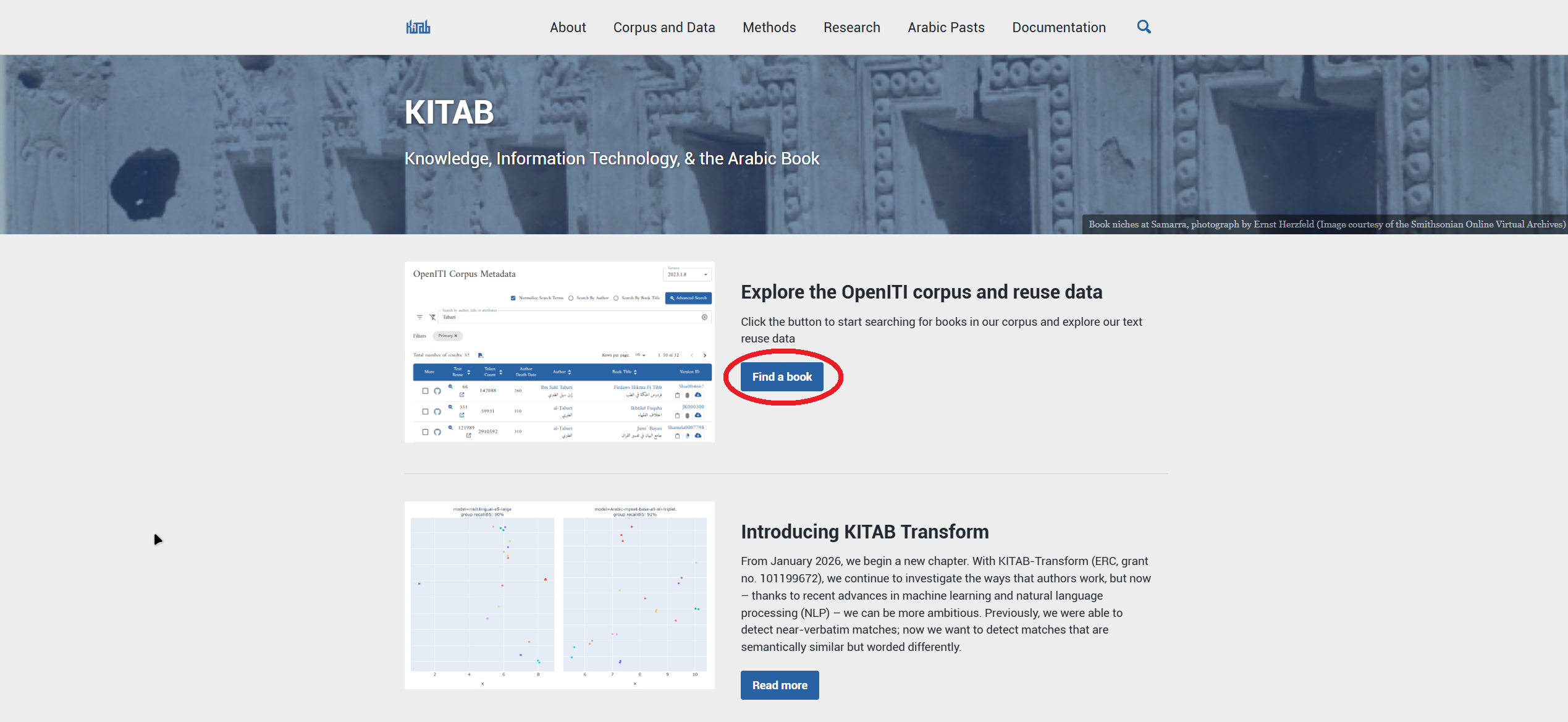
- Open Kitab's corpus exporer either through this direct link or through the Kitab project website: https://kitab-project.org, and then through the 'find a book' button on the main page (see image).
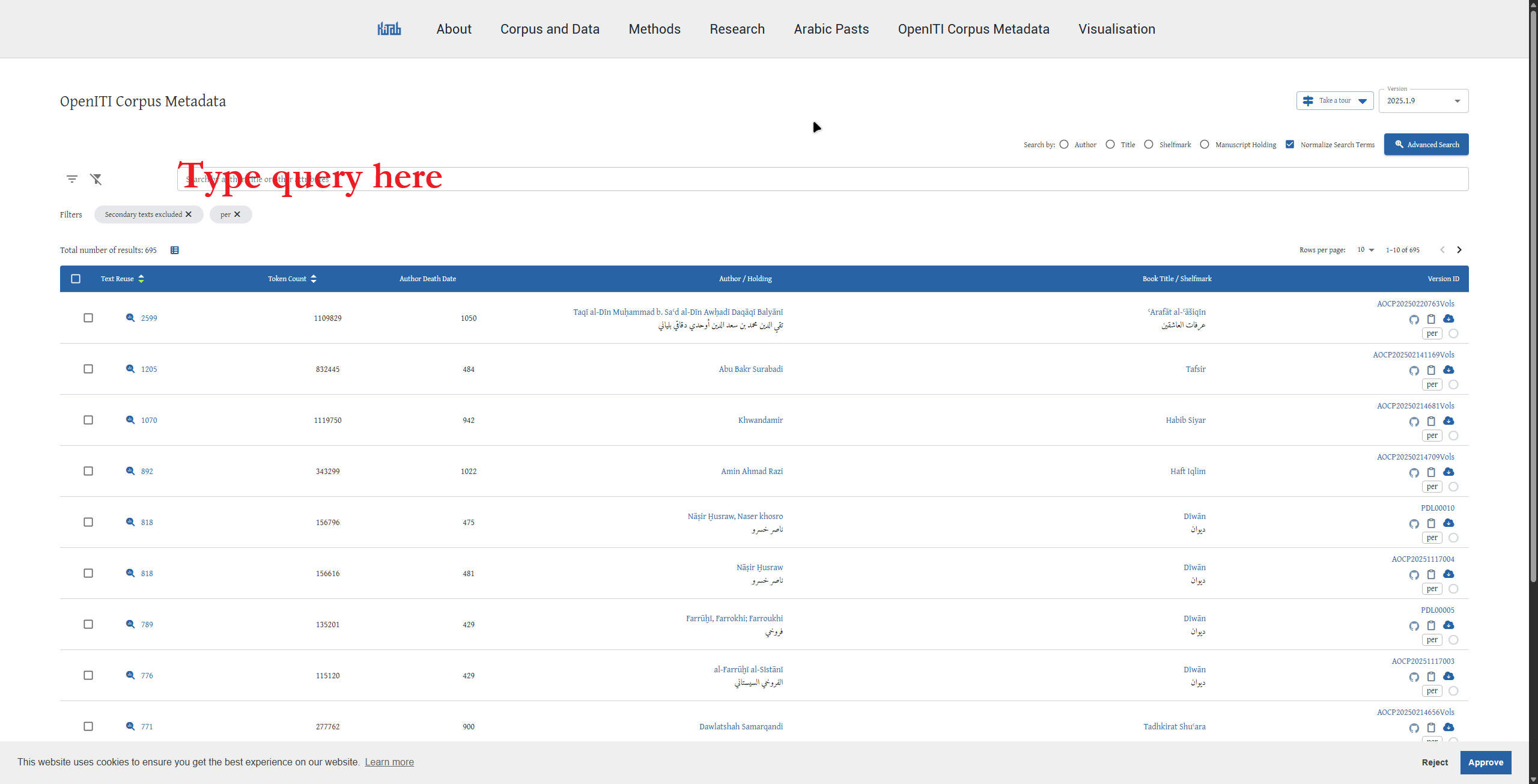
- To find IEDC documents from particular collections, enter the following search terms into the explorer's search bar (or follow the provided links):
- Firuzkuh Papers: Enter 'Firuzkuh' into the search bar.
- National Library of Israel: Enter 'Ms.Heb.8333.' into the search bar. This is the shelfmark prefix shared by IEDC documents from this collection.
- Khalili Collection: Enter 'Khalili collection' into the search bar.
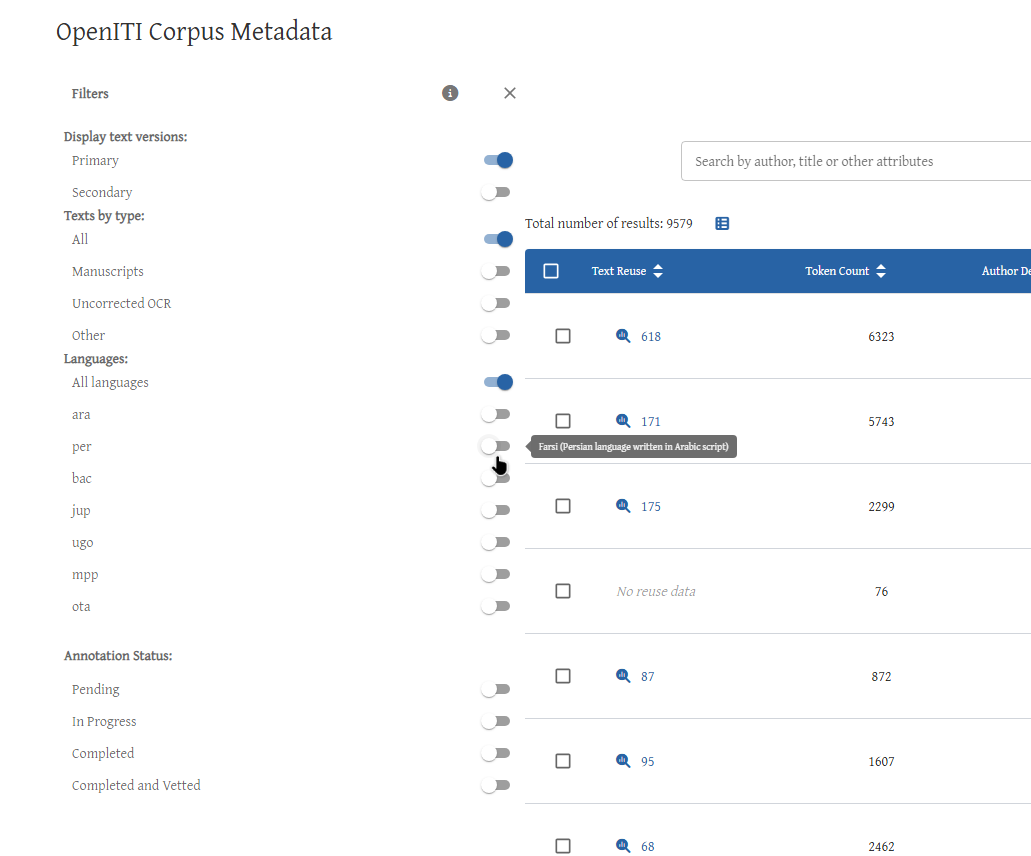
To narrow the results to documents in a particular language, select Filters, then choose the relevant language from the dropdown menu (see images). The languages are identified by three-letter codes:
- per – Persian
- ara – Arabic
- bac – Bactrian
- mpp – Middle Persian (Pahlavi)
To view documents in all available languages, leave the language filter set to All languages.
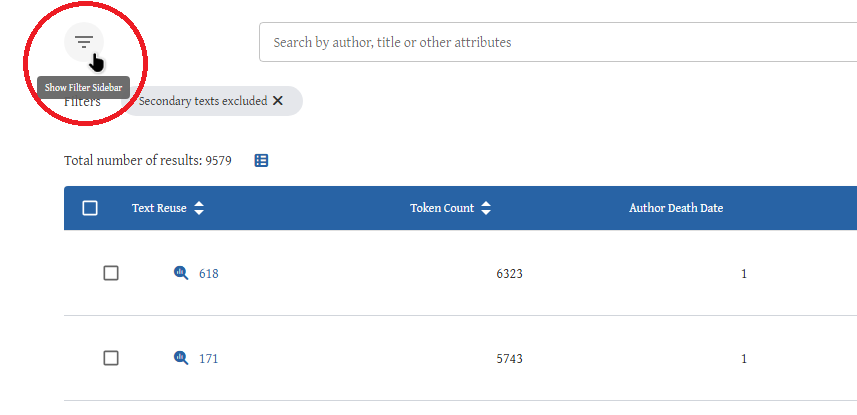
The explorer also allows users to search according to different fields, including title, author, shelfmark and manuscript holding.
The data
KITAB brings together expertise from computer science, history, linguistics and the study of written texts. Consequently, some of the information displayed in its tables may be unfamiliar to users without a background in digital humanities. The following explanations introduce the main headings (see underlined in the image, from right to left):
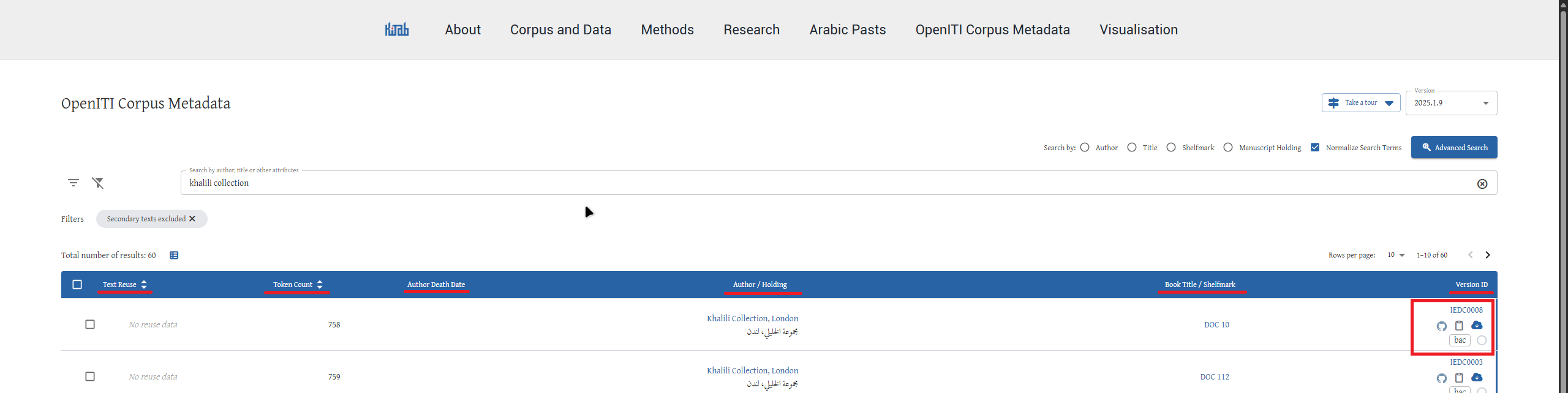
Version ID
Each digital text has a unique identifier, displayed in the first column. This identifies the particular digitised version of a text within the OpenITI corpus.
Below the identifier are several icons that allow users to interact with the entry. These include options for reporting a problem, copying the text's identifier to the clipboard, and downloading the digital text (see red box in the image above).
The entry also indicates the language of the text, using the three-letter codes explained above, and provides information about its annotation status.
Annotation refers to the addition of structural information to a digital text, such as marking headings, sections or other textual features. This makes it easier for researchers and computer programs to navigate and analyse its contents.
For further information about downloaded OpenITI texts and their markup, consult the OpenITI documentation.
Shelfmark / book title
The shelfmark or name under which the document/ book was incorporated into KITAB.
Author / holding
For literary works, this column normally identifies the author. For archival documents, it indicates the holding institution or collection.
For example, documents from the Firuzkuh Papers may be associated with the Afghanistan National Archive, while documents from the Bamiyan Papers may be associated with the National Library of Israel.
Author death date
For literary works, this column records the author's death date, which can help place the work in its historical context.
This field is generally not applicable to the IEDC archival documents discussed here.
Token count
This indicates the approximate length of the digitised text.
Computers measure text in 'tokens', which are usually individual words or punctuation marks. The token count can be taken as a roughly accurate word count.
Text Reuse
This column provides information about passages that KITAB has identified as appearing in other texts from the OpenITI corpus.
Text reuse means that two or more texts contain identical or sufficiently similar passages. KITAB identifies these connections using a computational method that searches for shared sequences of text.
Selecting an entry with reuse data opens a visualisation that allows users to investigate these connections in greater detail.
Importantly, textual similarity does not necessarily mean that one document was copied directly from another. Shared passages may also reflect common sources, conventional expressions, or documentary formulas.
Text reuse visualisation graph
To see the visualisation, click on the entry for text reuse (see image). Doing so opens a graph that
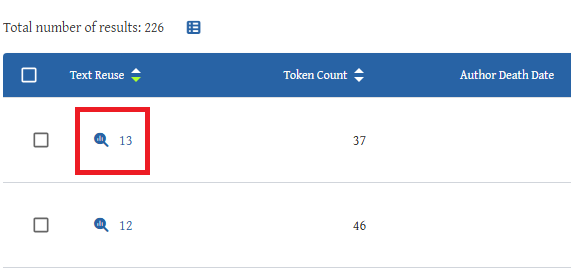
shows an interactive graph showing where KITAB has identified passages shared between the selected text and other texts in the corpus.
This graph provides a visual overview of which parts of the document have parallels elsewhere and which other works contain these parallels (see image).
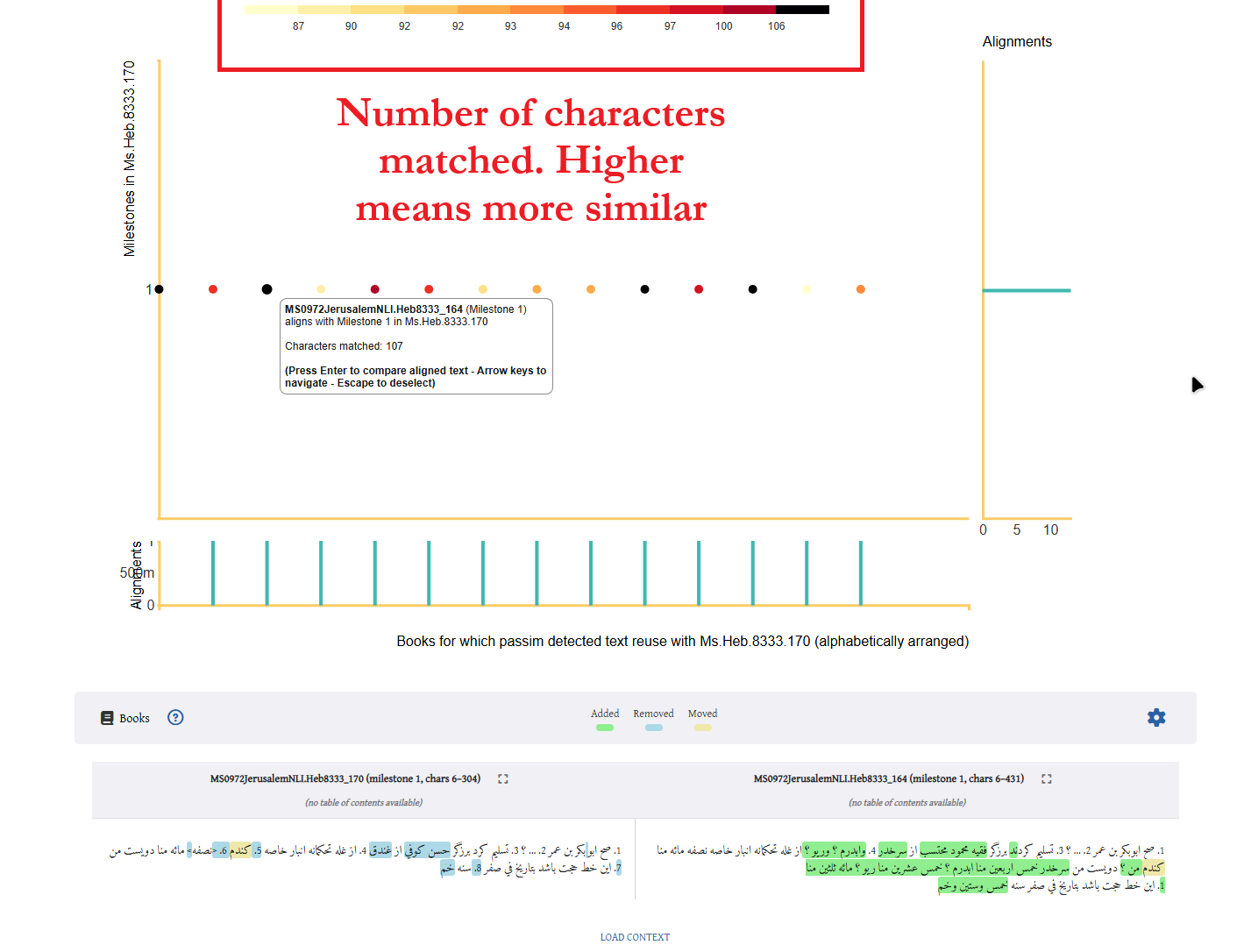
Reading the graph
The vertical axis (y-axis) represents the different parts of the selected text, divided into consecutive units called milestones. Each milestone normally contains 300 words.
The first milestone represents the beginning of the text and appears at the top of the graph; subsequent milestones appear further down.
The horizontal axis (x-axis) represents other texts in the corpus in which KITAB has detected related passages. These texts are arranged chronologically, with earlier texts on the left and later texts on the right.
Each coloured dot marks a detected correspondence between a passage in the selected text and a passage in another text.
The colour of a dot reflects the extent of the identified overlap: specifically, how many characters in the selected passage are included in the detected match.
For short documents, the entire text may fall within a single milestone.
Examining the matching passages
double-clicking a dot allows users to examine the corresponding passages in more detail.
The comparison viewer places the two passages alongside one another and uses coloured highlighting to identify textual similarities and differences.
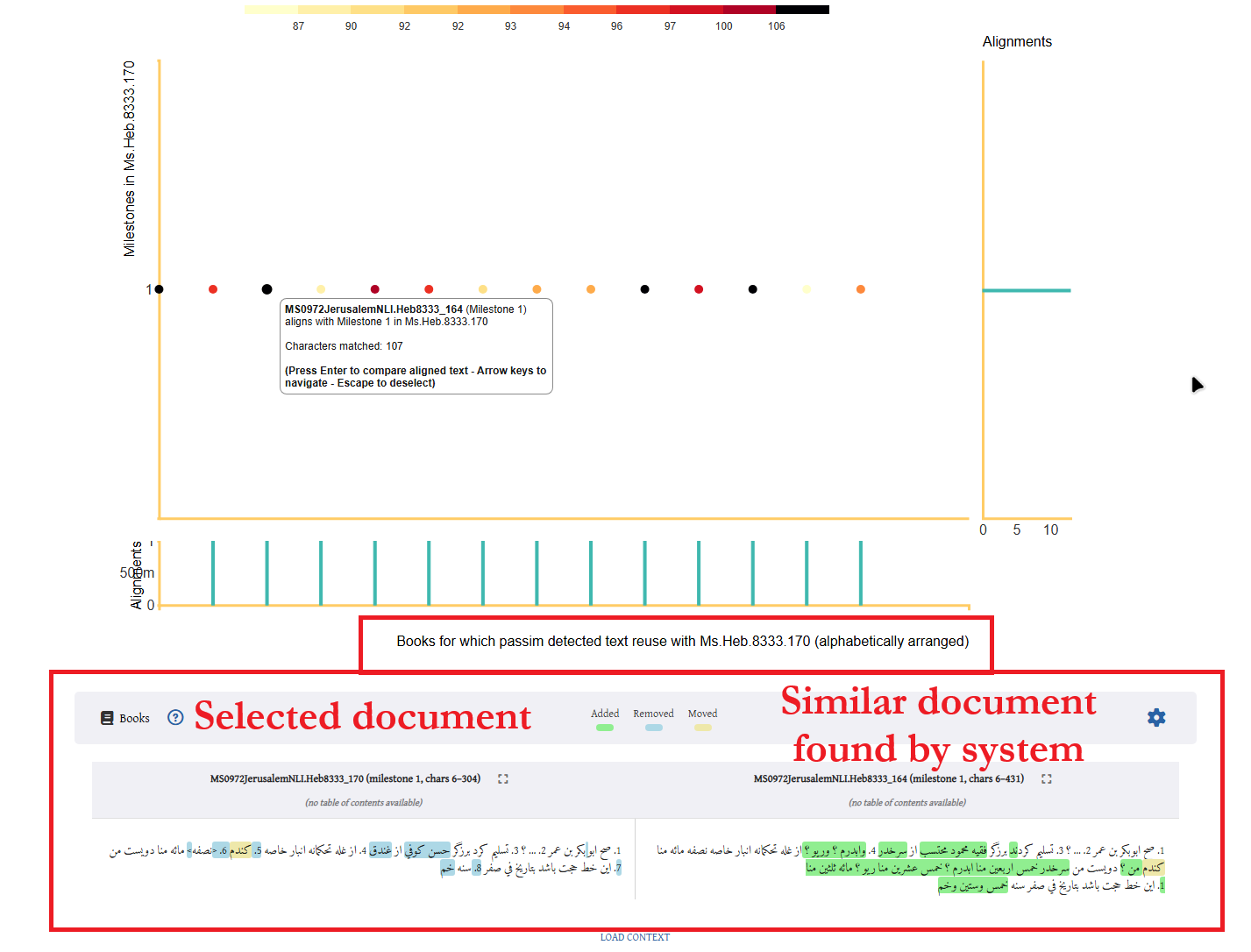
Depending on the viewer's display settings, users can distinguish words or passages shared by the two texts from wording that appears in only one of them. This makes it possible to identify both close textual correspondences and small variations in wording. Such comparisons can help researchers investigate whether two documents reproduce the same formula, share a particular phrase, or contain other noteworthy textual correspondences.
Interpreting the results
KITAB's automated comparisons are a starting point for further investigation, rather than definitive evidence of a historical relationship between two documents. A detected correspondence should be examined in context to establish whether it reflects meaningful textual borrowing, shared documentary conventions, or a more coincidental similarity.
Equally, the absence of identified reuse does not necessarily mean that no relationship exists: very short passages, paraphrases, spelling differences, or material outside the corpus may escape automated detection.
Readers who wish to learn more about how KITAB identifies and displays textual reuse can consult its guide to visualisations and explanation of the text reuse method.